Release Highlights 2026H1
Outfitting / 3D Plant Design
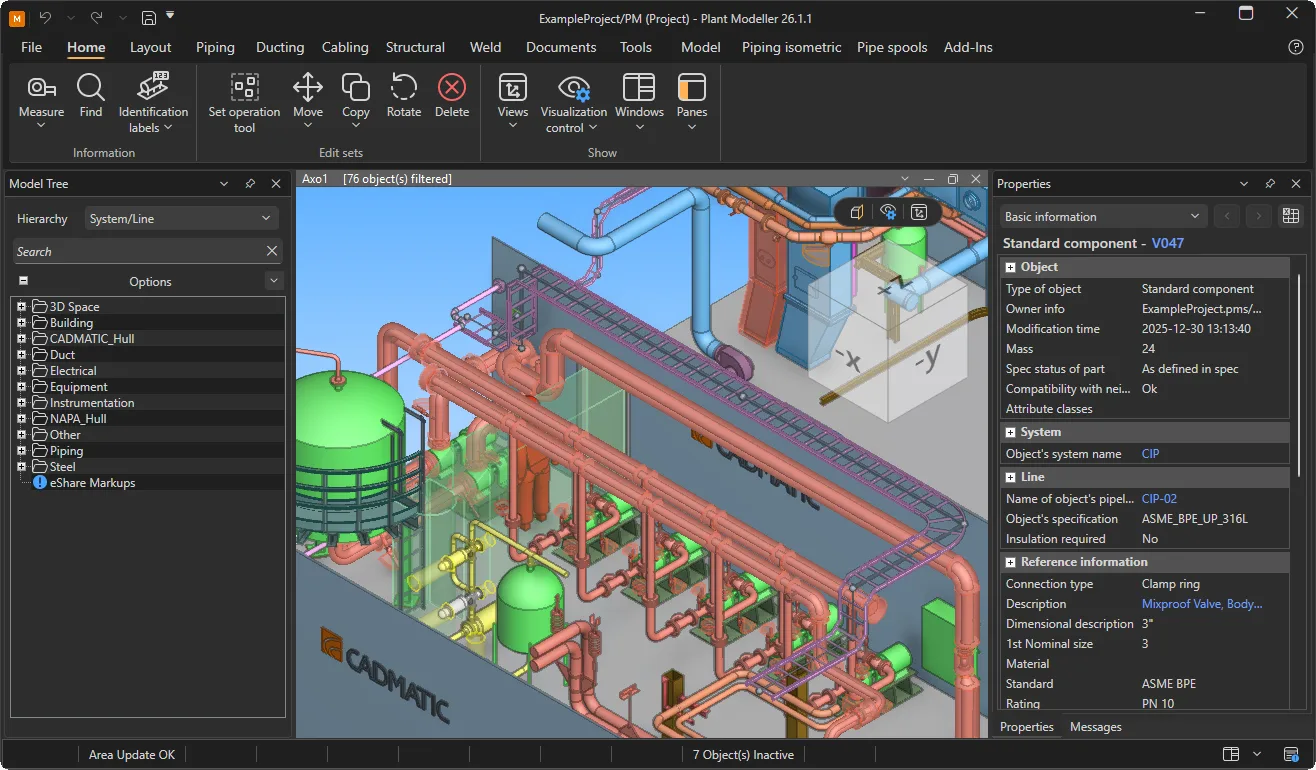
New ribbon interface
The new common ribbon provides a consistent, modern look and feel for Component Manager and Plant Modeller, improving usability and stability. Existing ribbon customizations continue to work as before, but icons can now be designed separately for light and dark mode.
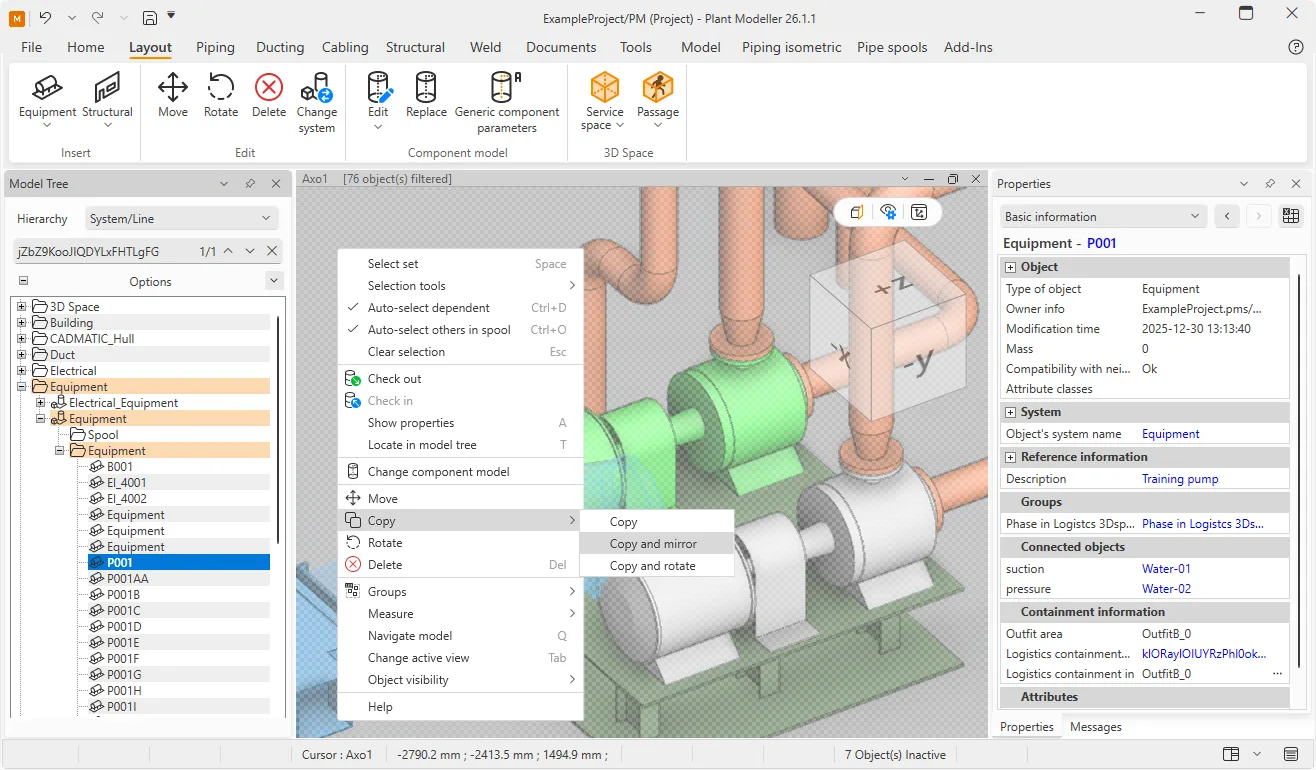
Context-based object actions
3D and 2D views and their contents are now much easier to manage with immediate access to most often needed commands and options. Modeling views can be panned, rotated, and zoomed without focusing the cursor in the view, and placing the cursor over an interactable element enables the context menu to address that specific object type.
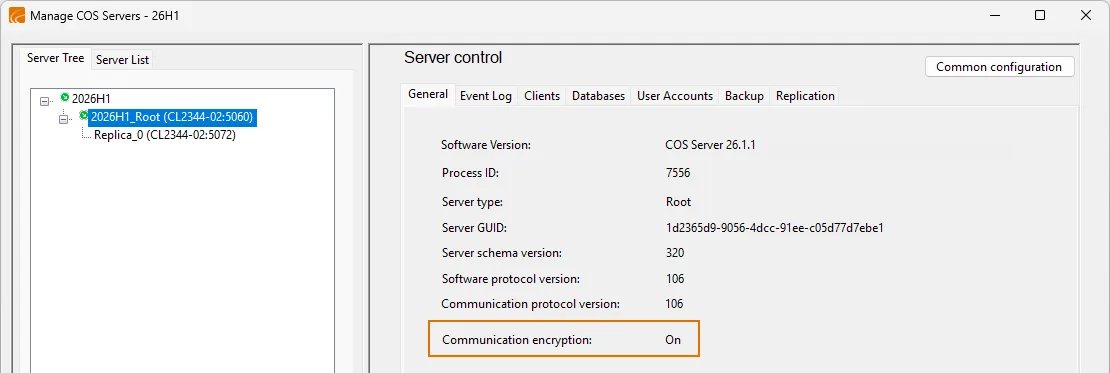
Secure COS transfers and user deactivation
COS servers that are set up to use encryption transfer data securely from one site to another.
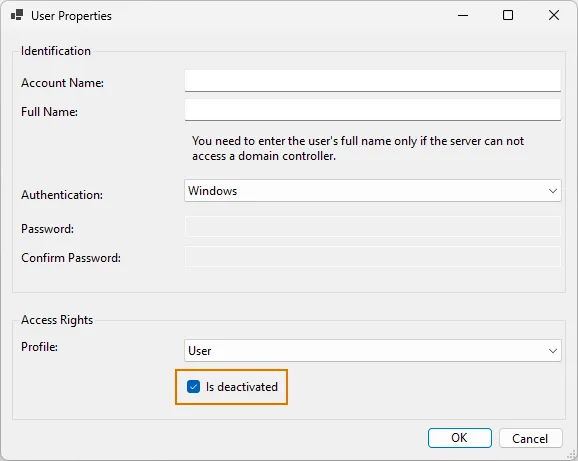
Users who are no longer present in a project can be deactivated so that their change history is preserved while further access is denied.
Improved pipe routing
Pipe routing can now be performed automatically using a grid of user-defined routing points. Other improvements include automatic insertion of reducers when valve is smaller than the piperun, automatic insertion of reinforcement pads for stub-in branches, ability to rotate and move branches, end pipe routing with a terminator, and warn the user when the straight pipe between bends is too short.
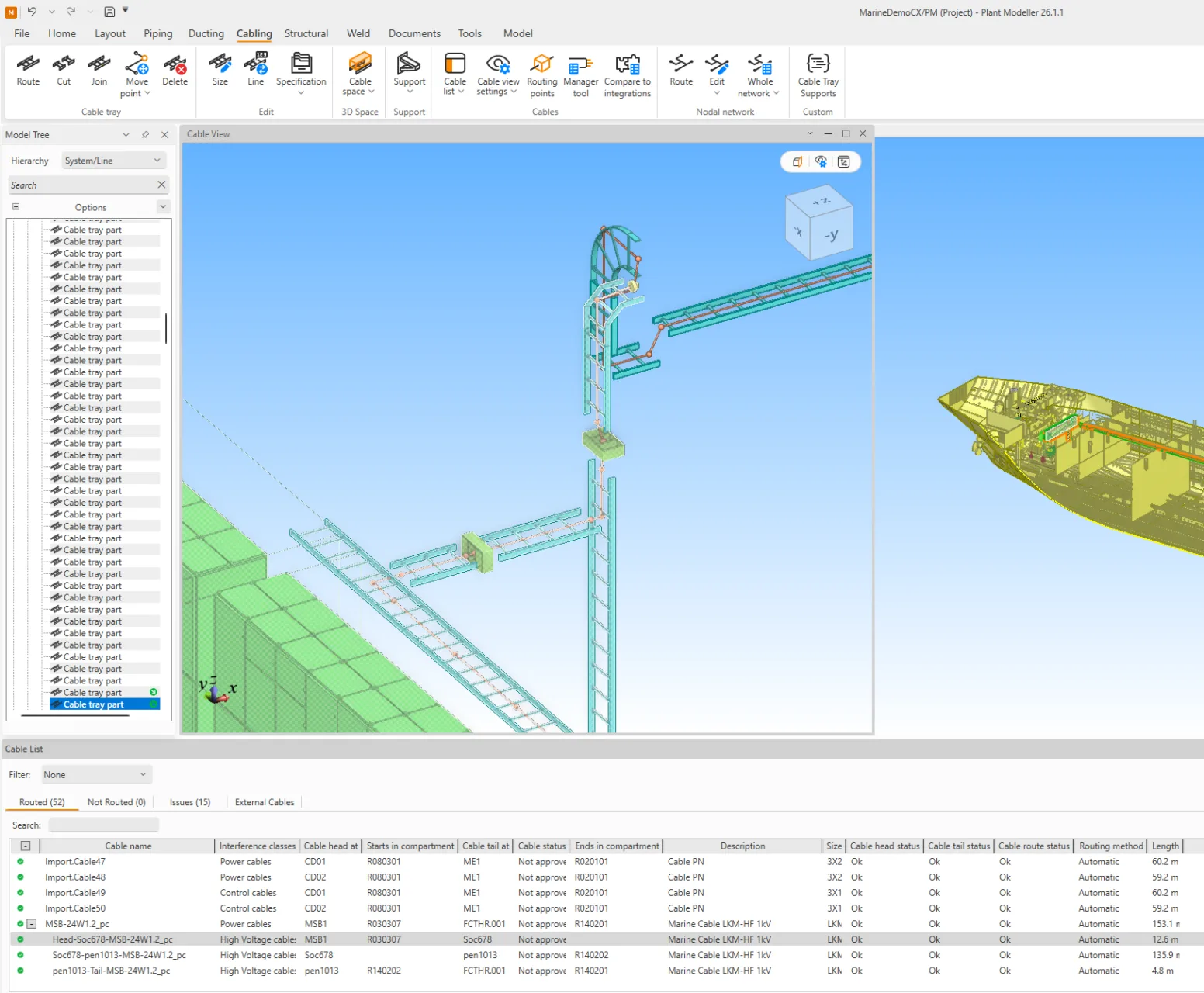
Partial cable routing
Cable routing now supports partial cable routes using user-defined routing points. This feature supports workflows in which only some blocks have been modeled when cable routing starts, or workflows where routing responsibilities are distributed among multiple designers based on the cable’s location within the 3D model. Each designer can complete their part of the route independently, regardless of the progress of other designers. Partial cable routing, along with cable routing network management, can be performed directly from the Cabling tab.
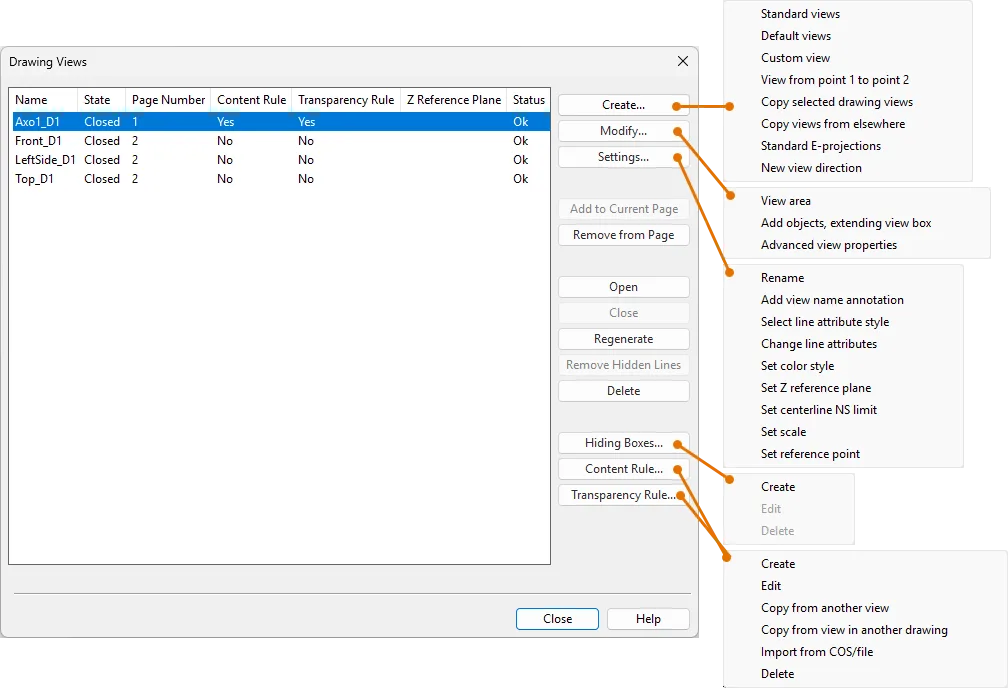
Improved drawing view management
Drawing views are now much easier to create for different viewing directions and different sets of objects. Improved managing of content rules, transparency rules, and hiding boxes make it easier to set up drawing views as needed and copy rules from one view to another, even across documents.
P&ID
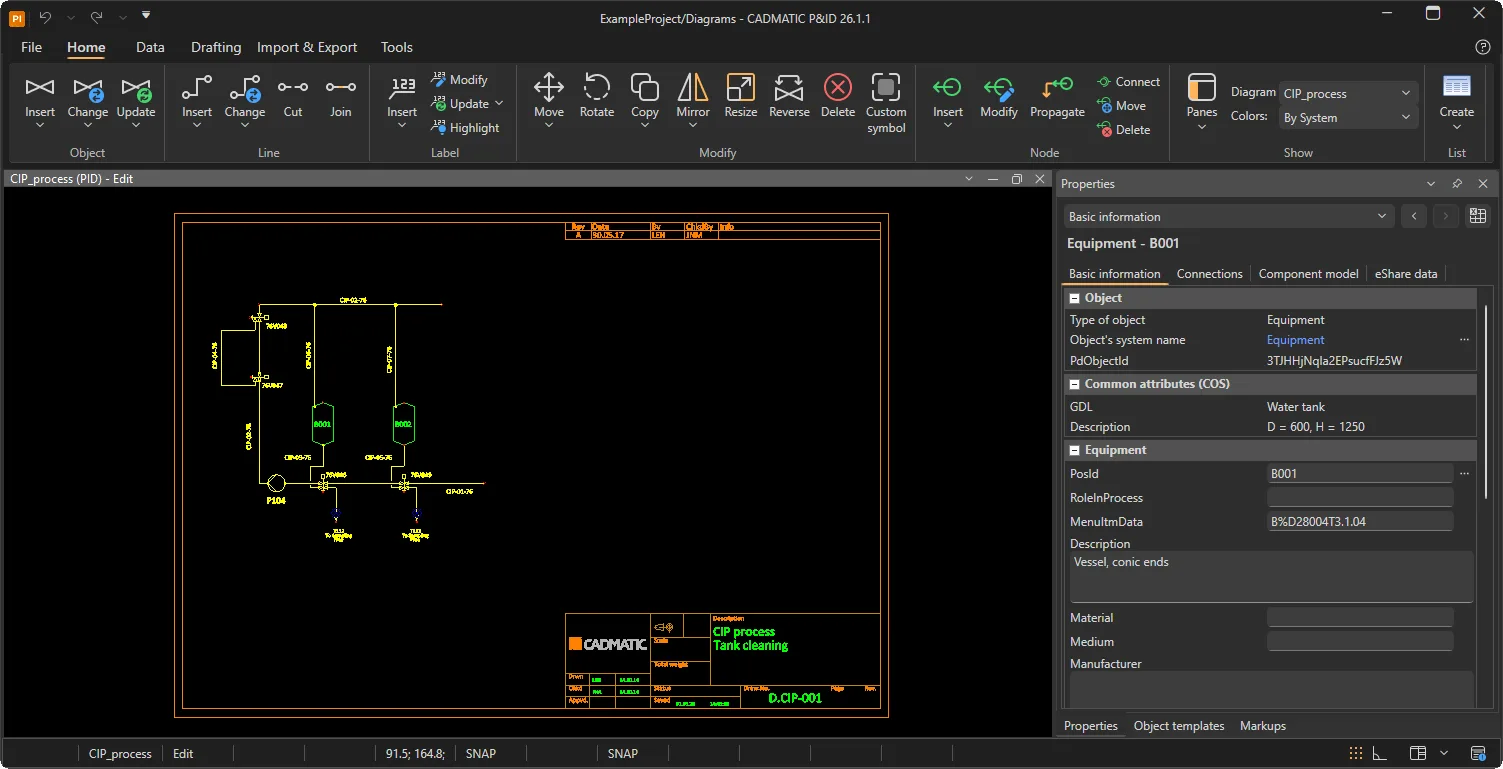
New ribbon interface
The new common ribbon provides a consistent, modern look and feel for P&ID, improving usability and stability. Existing ribbon customizations continue to work as before, but icons can now be designed separately for light and dark mode.
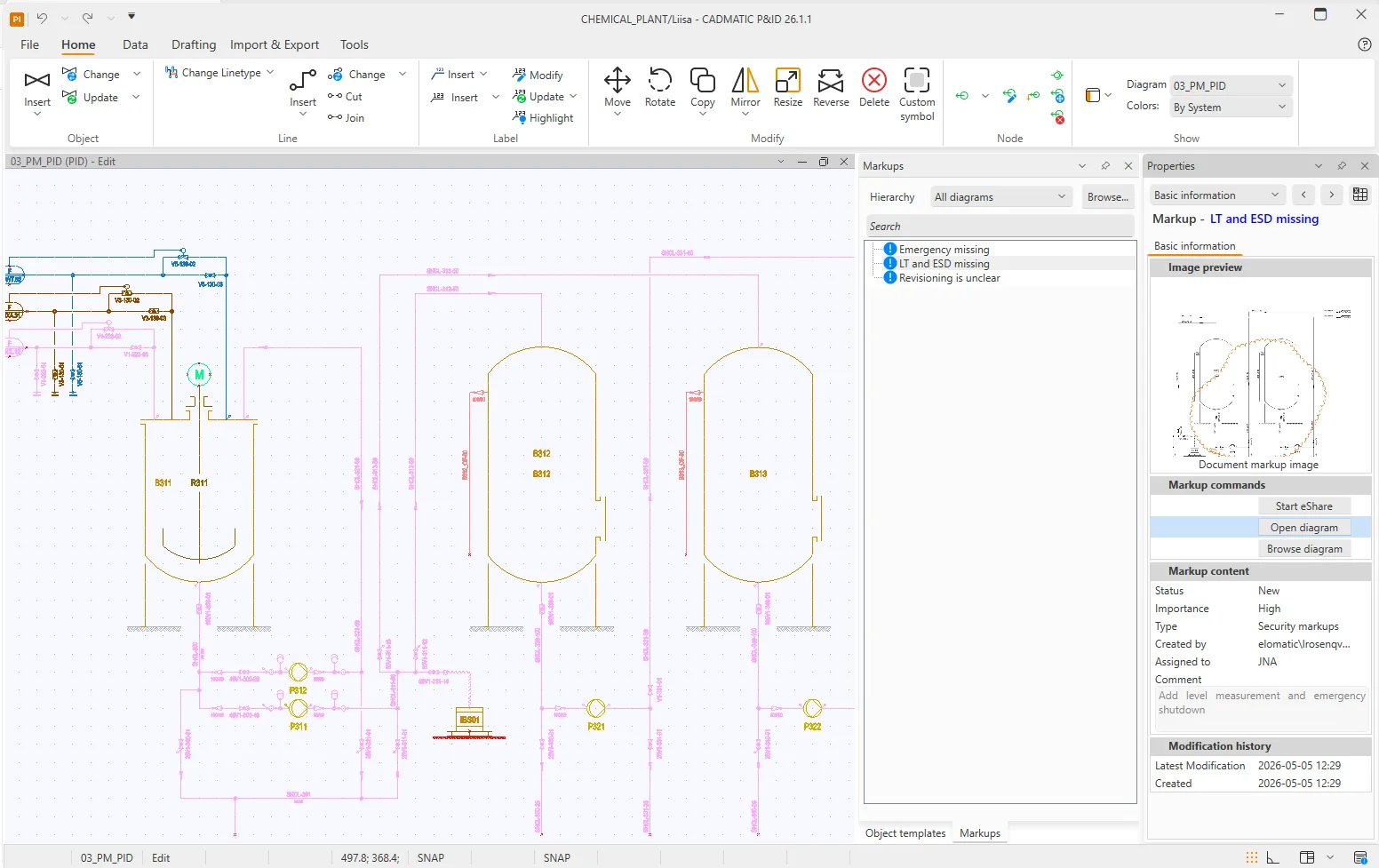
eShare markups
Document markups that have been attached to the active diagram in eShare can now be conveniently browsed directly in the P&ID user interface. This allows diagram designers to receive instant review feedback and access the full markup by opening it in eShare in a web browser.
Hull
Hole management in Hull made easy
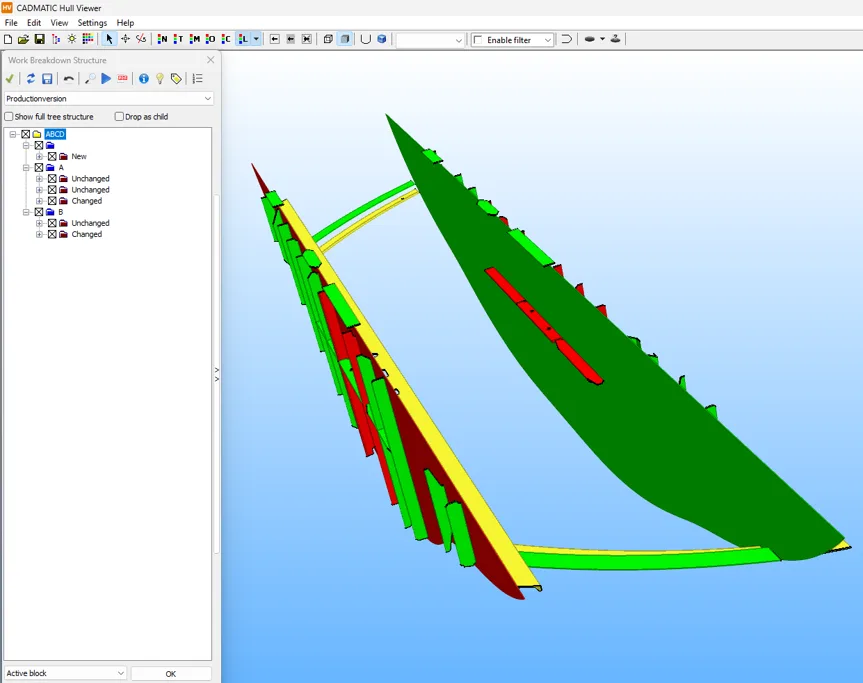
Hole Request Manager brings clear and shared visibility of hole requests directly into the Cadmatic Hull Viewer, helping teams stay aligned between Hull and Outfitting.
This new integrated tool allows Hull users to inspect, manage, and modify hole requests within a single, consistent workflow. Hole requests from Outfitting are presented in one shared view, reducing misunderstandings and improving collaboration throughout design and production.
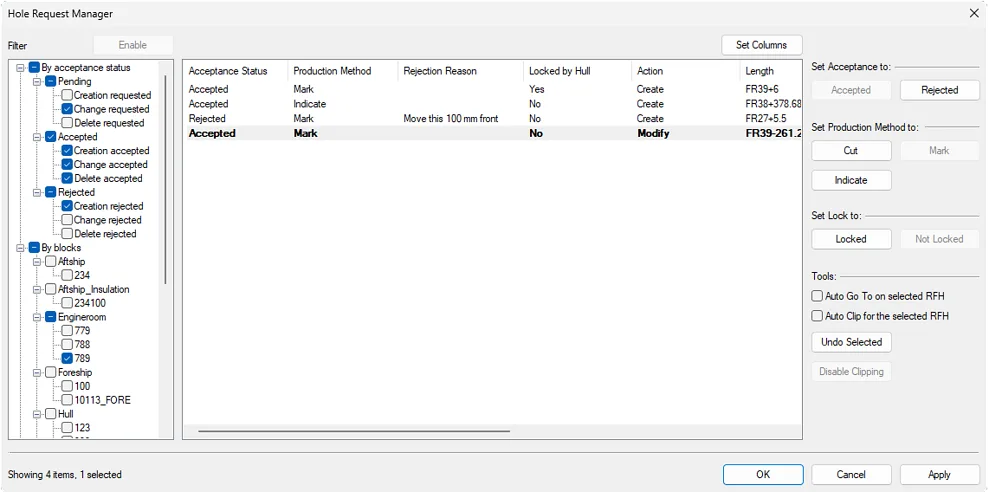
Users can quickly review new and changed hole requests using flexible filtering and sorting, and visually inspect holes together with surrounding structures in the 3D environment. Acceptance statuses, production methods, and locks can be efficiently applied to individual holes or in bulk.
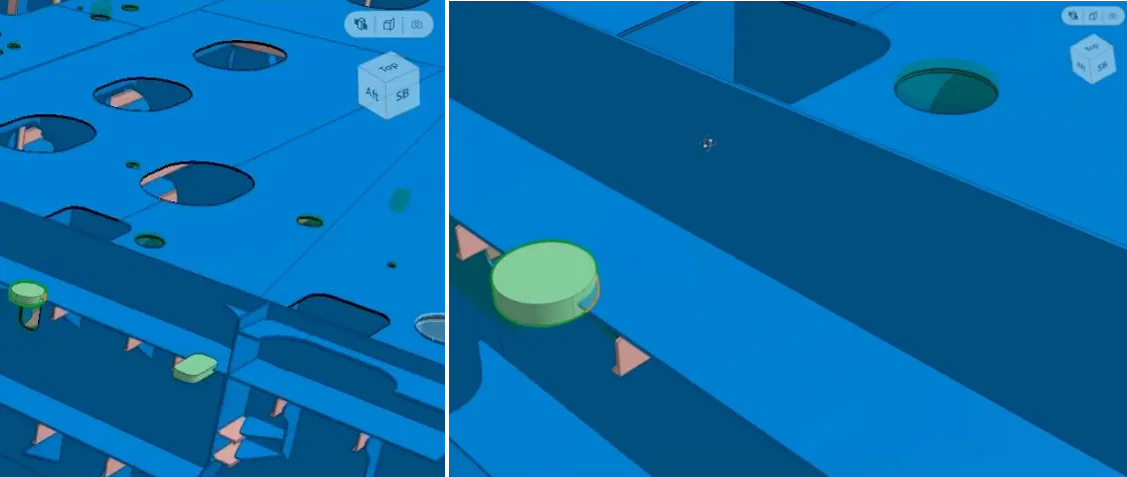
With customizable columns and clear status tracking, Hole Request Manager reduces manual checks and rework, helping Hull and Outfitting teams stay in sync, and supporting smoother handover from design to production.
Check out and check in for clear alignment
The Check Out/In dialog has been redesigned to provide clearer insight into data status and to make synchronization tasks faster and more reliable in Cadmatic Hull.
The updated dialog presents data in a clear and structured way, allowing users to immediately see what is checked out, modified, or out of sync. Customizable columns and an integrated search make it easy to find individual blocks or entire block series, even in large projects.
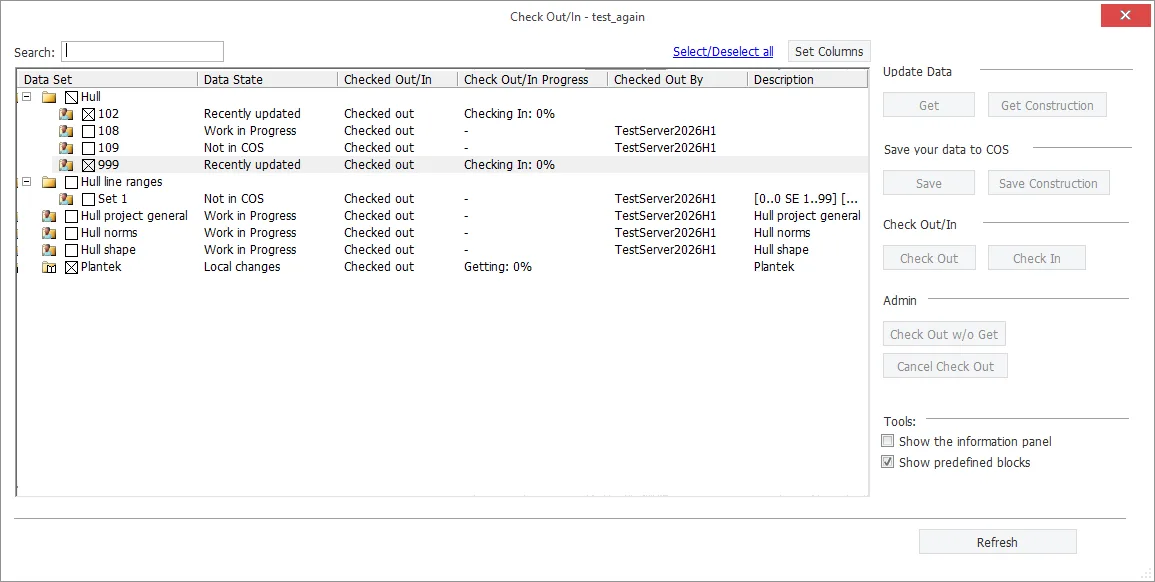
When data is not synchronized, the dialog clearly indicates the situation and offers direct follow-up actions. This removes ambiguity around data state and reduces unnecessary communication and data transfers.
By improving visibility, validation, and access to synchronization actions, the renewed Check Out/In dialog strengthens Hull’s workflow and helps teams stay aligned across projects.
Validated input with Wave documentation requests
Publication Manager introduces a structured and reliable way to publish Hull documents and process Cadmatic Wave documentation requests through a controlled workflow.
With Publication Manager, Hull documents are published using built-in validation that increases document quality, traceability, and reuse. Integration with Cadmatic Wave ensures that published documents match approved production requirements.
Wave-originated requests can be accepted, linked, and completed directly in the Publication Manager. Published Hull documents become fully traceable in Cadmatic Wave, including transparent revision handling and publication history across the project lifecycle.
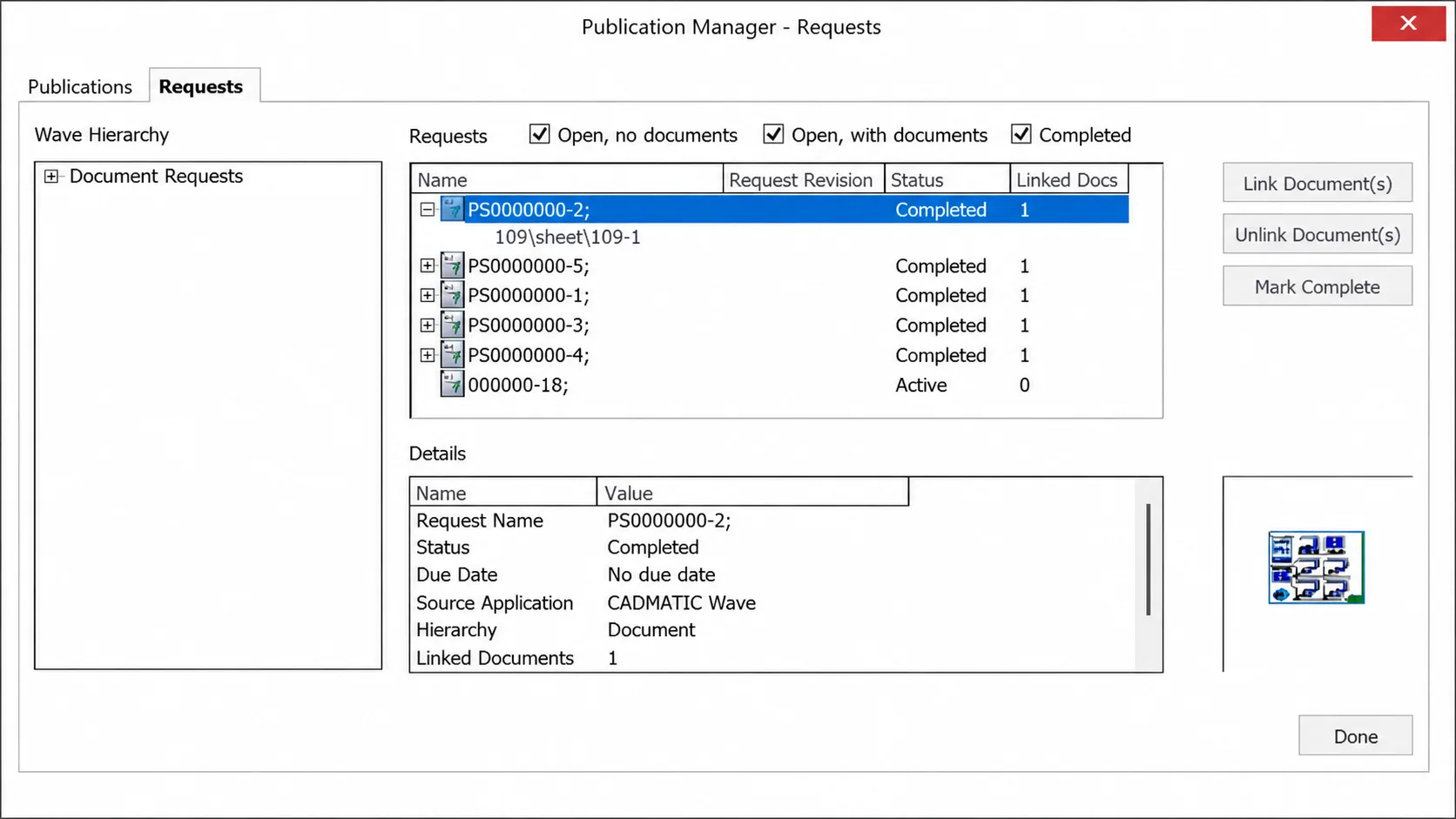
By replacing manual checking with an automated and validated workflow, Publication Manager saves time while improving the reliability of production-ready documentation.
Detailed production check and delivery with PI Revision Check
The Production Information (PI) Revision Check has been extended to provide a more precise and automated way to validate and deliver production data from Cadmatic Hull.
The enhanced PI Revision Check automatically identifies missing or out-of-date production information and verifies it against customizable output requirements. Using job codes and output-specific rules, production data can be checked according to the actual manufacturing process of each part.
Part versions are updated only when parts are new or have changed, preventing unnecessary revisions in downstream production flow. All part production data can be reviewed directly from the model.
With automated validation, controlled packaging, and delivery of production-ready data, the extended PI Revision Check reduces manual verification work, minimizes rework caused by incomplete production information, and supports a smoother transition from design to production.
Information Management
Document-centric digital twin support in eShare
Digital twins may now be constructed based on document content alone. Link between documents, and to dataset information, without coordinating through a 3D model. With this release, both model object data and data from external data sources can be viewed consistently across all user views, making critical information accessible regardless of how the asset or project is represented.
This means that even when your only reference for an item is a 2D drawing or document, eShare can still surface relevant external data and contextual information. Teams can structure, navigate, and work with drawings, reports, specifications, and other documentation as first‑class elements of the digital twin, while maintaining strong connections between documents, objects, and external systems. The digital twin remains informative and actionable even in situations where models are incomplete, evolving, or not available.
These improvements are especially valuable in document‑driven environments such as early project phases, infrastructure projects, brownfield and legacy assets, and regulated industries where documentation plays a central role. By reducing dependence on heavy 3D content, eShare lowers the barrier to adoption for users accustomed to document‑based workflows, enabling faster onboarding and effective use without requiring deep modeling expertise. At the same time, it preserves a consistent, connected view of trusted information across lifecycle stages, broadening the applicability and long‑term value of the digital twin across diverse project types and organizational practices.
Improved logging and telemetry for insight on eShare usage
eShare now provides enhanced logging and telemetry that deliver a clearer and more detailed view into system behavior, performance, and usage. Even with logging alone, these capabilities make it easier to track key operational metrics such as system performance and license usage, helping administrators and operators understand how eShare is being used and where attention may be needed.
For organizations that require deeper insight, OpenTelemetry support can be enabled to expose eShare usage and performance data to external observability tools. This opens the door to more advanced and customizable dashboarding solutions, allowing usage trends, performance characteristics, and system behavior to be monitored at a very high level of detail.
By integrating eShare telemetry with existing monitoring and analytics platforms, teams can troubleshoot issues more efficiently, support capacity planning, and make informed decisions about optimization and scaling. Together, these improvements provide stronger operational confidence and help organizations manage and evolve their digital twin environment more effectively as usage grows.
Electrical
Update Service replaced by Cadmatic Support Portal
We are renewing our support services and consolidating them into one modern service channel: Cadmatic Support Portal. As part of this change, the Update Service (cads.fi/updateservice) website will be discontinued.
From now on, all support services will be available in one place: Cadmatic Support Portal at https://supportportal.cadmatic.com/en/support/login/new.
Marking renewal
Marking renewal takes marking functions to the next level! Users can now create and define custom marking symbols for objects, as well as dynamic markings with leaders and frames. In addition, new mass insertion functions significantly reduce manual work and boost efficiency.
User-defined marking symbols
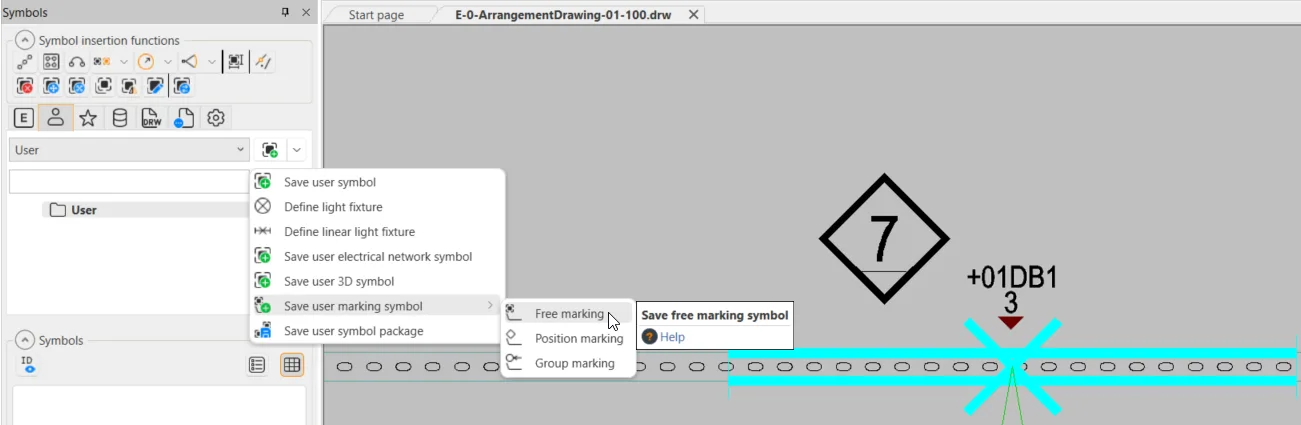
The ability to create custom marking symbols is essential. Users can now create and insert their own group, position, and free markings. Any type of graphics with required data attributes can be defined according to project needs.
A free marking is a special marking that can be freely attached to objects or even to product models. When used with product models, markings can be automatically inserted using a user-defined offset. Below is an example of a free marking that displays the distribution board ID and group number to which a light fixture is connected:
Dynamic markings
The Insert info to drawing function has been updated to support new marking styles and has been renamed to Add object information. Users can, for example, include attributes, a leader, and a frame, and define settings such as colors to create markings that meet project requirements.
When a marking is moved, the leader and frame automatically adjust, scaling according to the length of attribute values. Frame scaling is especially important when text lengths vary, ensuring that text always fits within the frame.
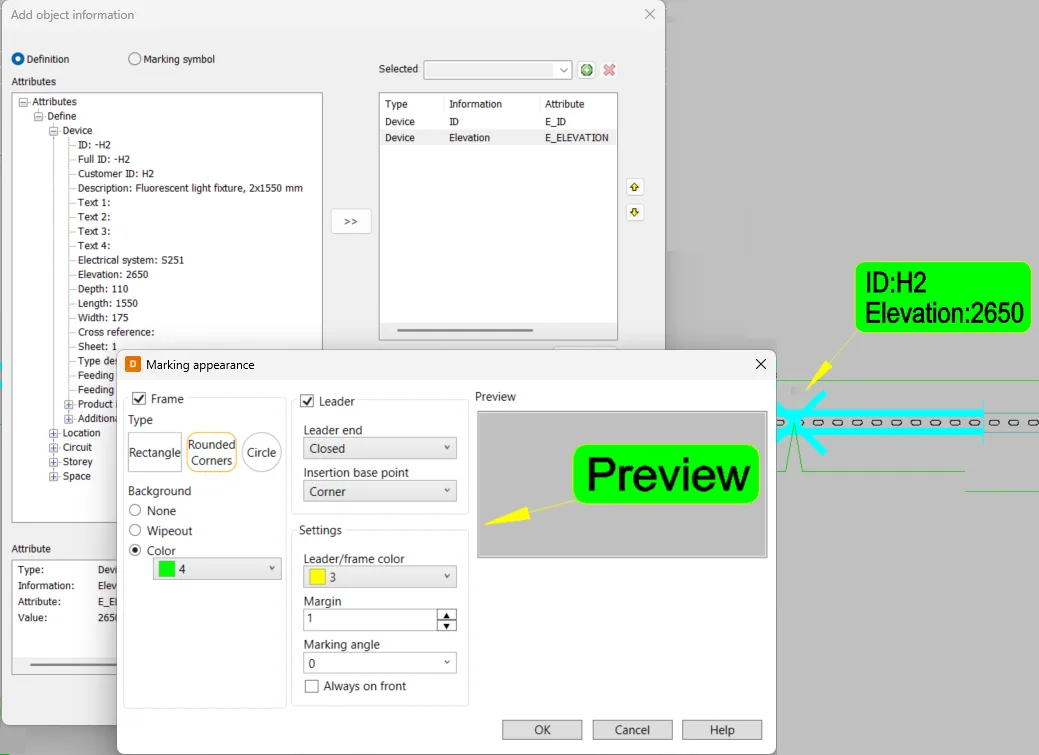
Marking properties can be modified after insertion, and the markings update accordingly. Users can also easily save marking settings for future use.
AI for efficient product and translation management
AI development plays a key role in enhancing efficiency by automating repetitive tasks, enabling users to save time and focus on higher-value work. With the latest AI features, users gain powerful tools for managing product libraries and language translations, streamlining workflows, and improving overall productivity.
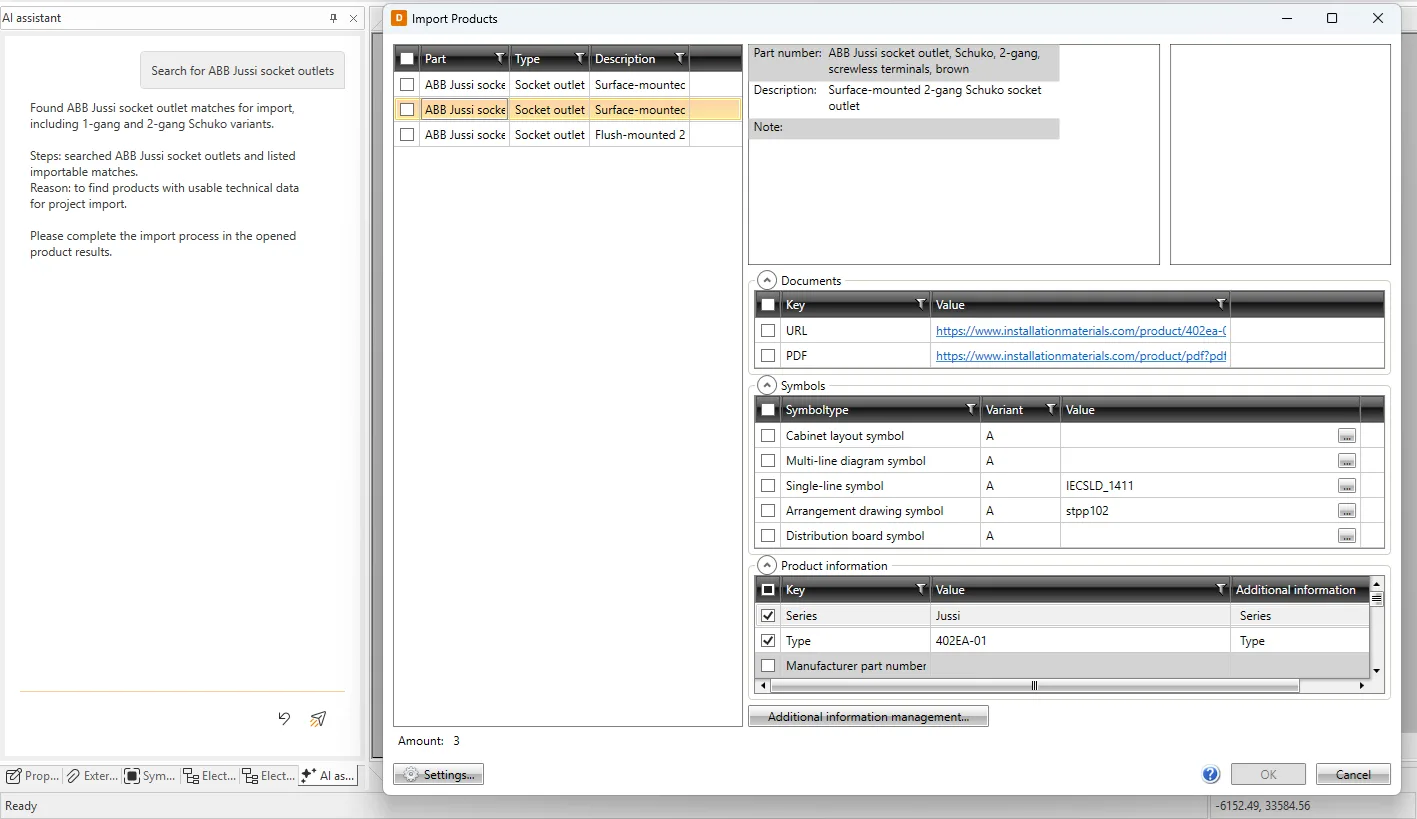
AI-based product library creation simplifies the process of building and maintaining product catalogs. Users can request specific products or generate lists based on defined specifications. Users can then choose which items to add to the product library, and which data to import and save definitions for future use. Each product is created as a product model, and additional product information can optionally be generated for the product model as well.
The translation management function, released in 2025H2, allows users to store essential term translations in the database. In this release, a new AI-based translation function is introduced, significantly reducing the need for manual translation. The AI uses carefully designed prompts to ensure translations are contextually accurate and aligned with electrical industry terminology, improving clarity and consistency.
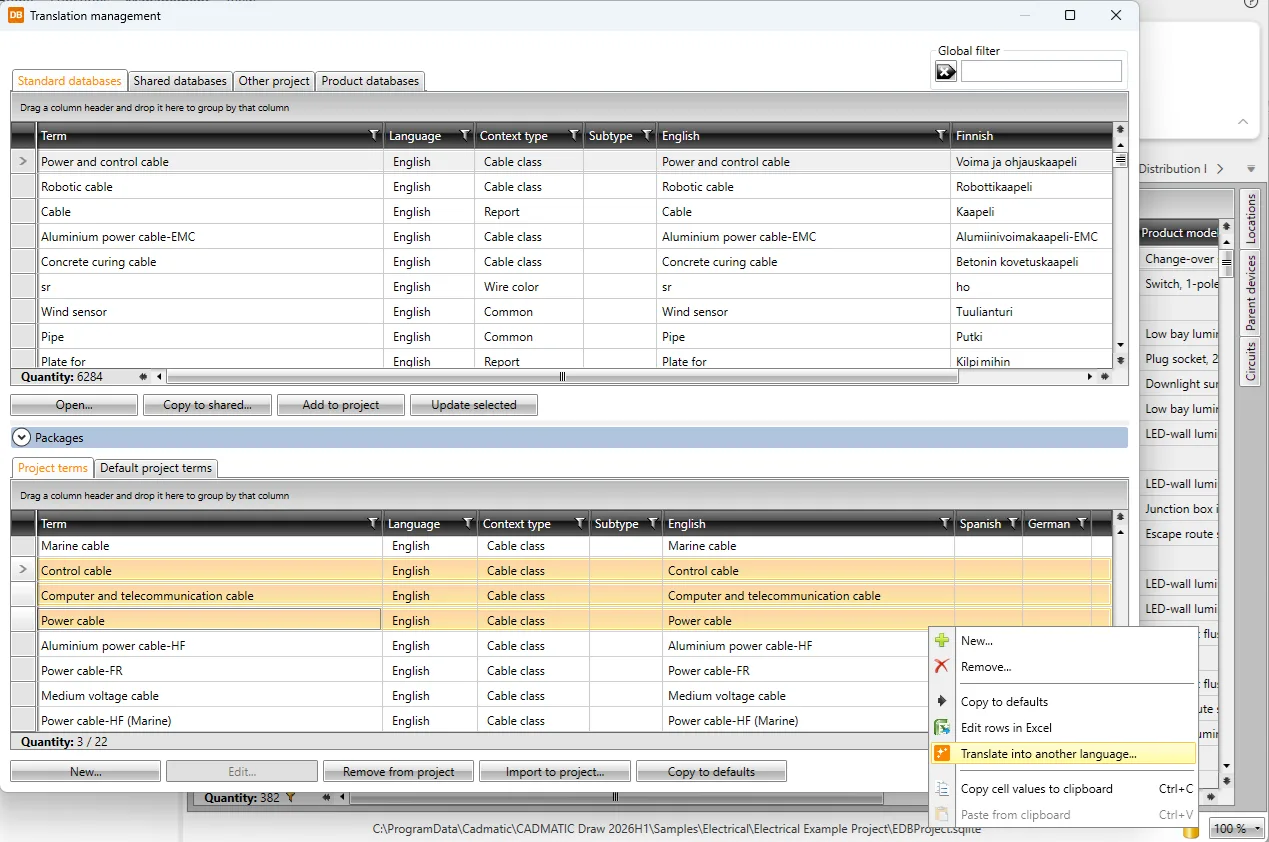
AI functions are available with subscription and COL licenses.
Reporting improvements
Creating reports from project data is an essential part of the project workflow, enabling the production of sum lists, device lists, cable lists, and other reports. Because reporting requirements and visual layouts vary widely, reporting tools must be flexible and efficient.
This release includes multiple smaller reporting improvements. Users can now edit the settings of an already generated report via the report context menu, as well as update and open the selected report.
Other enhancements:
- It is now possible to open the selected template location.
- Default templates are now filtered according to the selected report type.
- Only English templates are now provided, with headers translated automatically based on the selected language.
- Grid settings are remembered, so hidden or reordered columns are saved for future use.
Draw
Update Service replaced by Cadmatic Support Portal
We are renewing our support services and consolidating them into one modern service channel: Cadmatic Support Portal. As part of this change, the Update Service (cads.fi/updateservice) website will be discontinued.
From now on, all support services will be available in one place: Cadmatic Support Portal at https://supportportal.cadmatic.com/en/support/login/new.
Enhancements and new features
The MText editor and the management of MText elements have been thoroughly reengineered. Editing is now done directly within the drawing area, enabling users to immediately preview changes in real time. Notable additions to MText include paragraph formatting and bullet support.
Additionally, the Dynamic input feature enables contextual entry of drawing commands, replacing traditional command line input. This function also provides clear visual indications of where user input will be applied within the drawing environment.
Construction
Import mode for Heat Numbers / Heat Certificates association
With the 2026H1 release, the ability to perform bulk import of the association between Heat Numbers and Heat Certificates has been introduced within the “Heat Numbers” form, using a dedicated template.
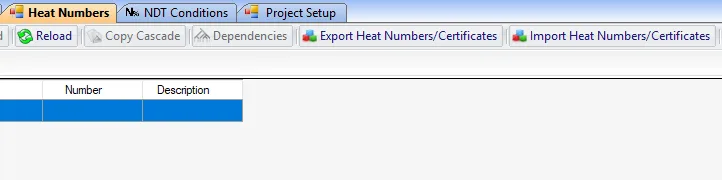
Report 19 (Traceability Report) – new implementations
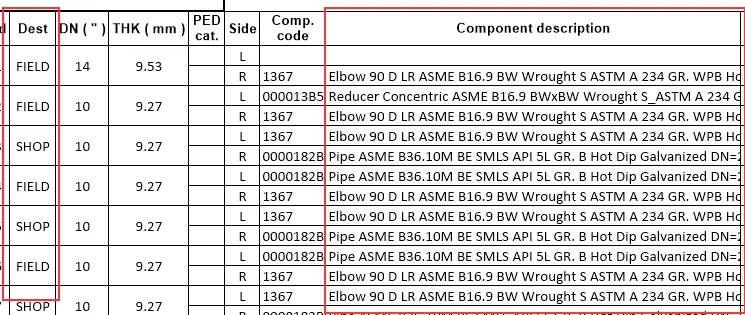
New enhancements have been introduced for Report 19.
Specifically:
- Added the Weld Destination column to distinguish (and filter) Shop welds from Field welds.
- Changed the default alignment of the Description column from center-aligned to left-aligned.
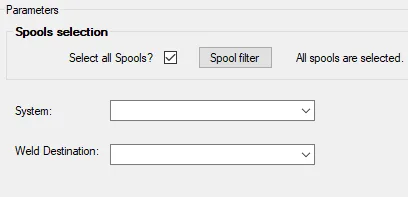
- Added the Shop/Field filter as an additional parameter when running the report.
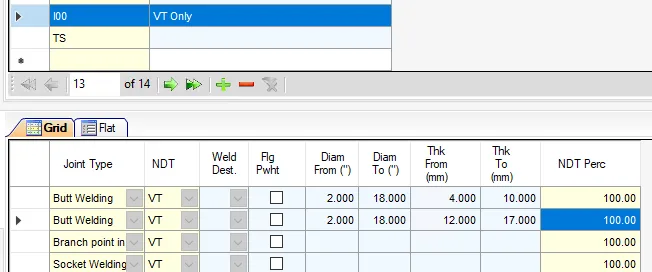
NDT Condition – Same diameter range, different thicknesses
We have introduced support for multiple thickness ranges associated with the same diameter range under the same application conditions within the NDT Condition form.
This enhancement allows WB to handle a wider range of scenarios related to the definition of NDT Conditions.
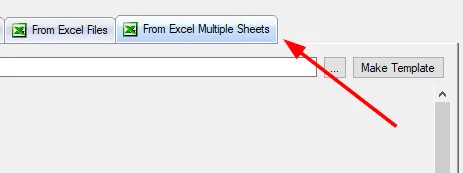
Import Data – Import mode using a multi-sheet Excel file
The ability to perform bulk data import via the “Import Data” form has been introduced, using a single multi-sheet Excel file.
As a result, it is now possible to generate a single import template and process all import contexts with a single command.
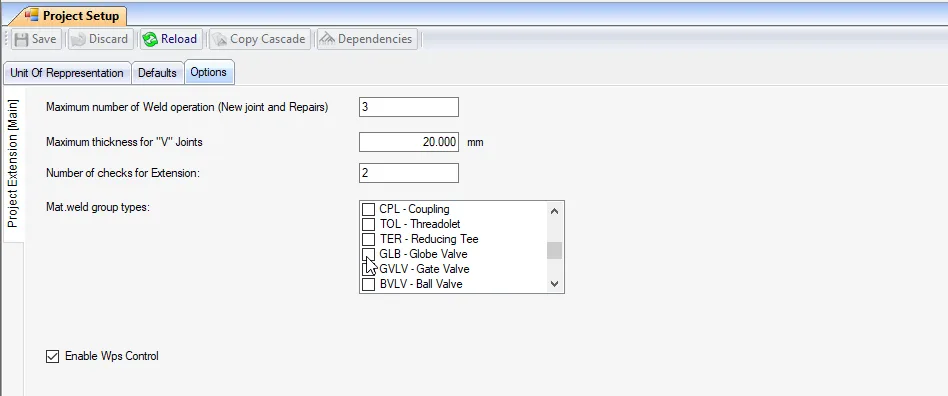
Project setup/options – Material weld group type selection
An undesired behavior occurring when the number of items exceeds the visible limit (six items) has been fixed.
Specifically, whenever an item beyond the seventh position is enabled, the currently selected item is automatically moved to the top of the list, forcing the user to scroll vertically again after each interaction.
Materials
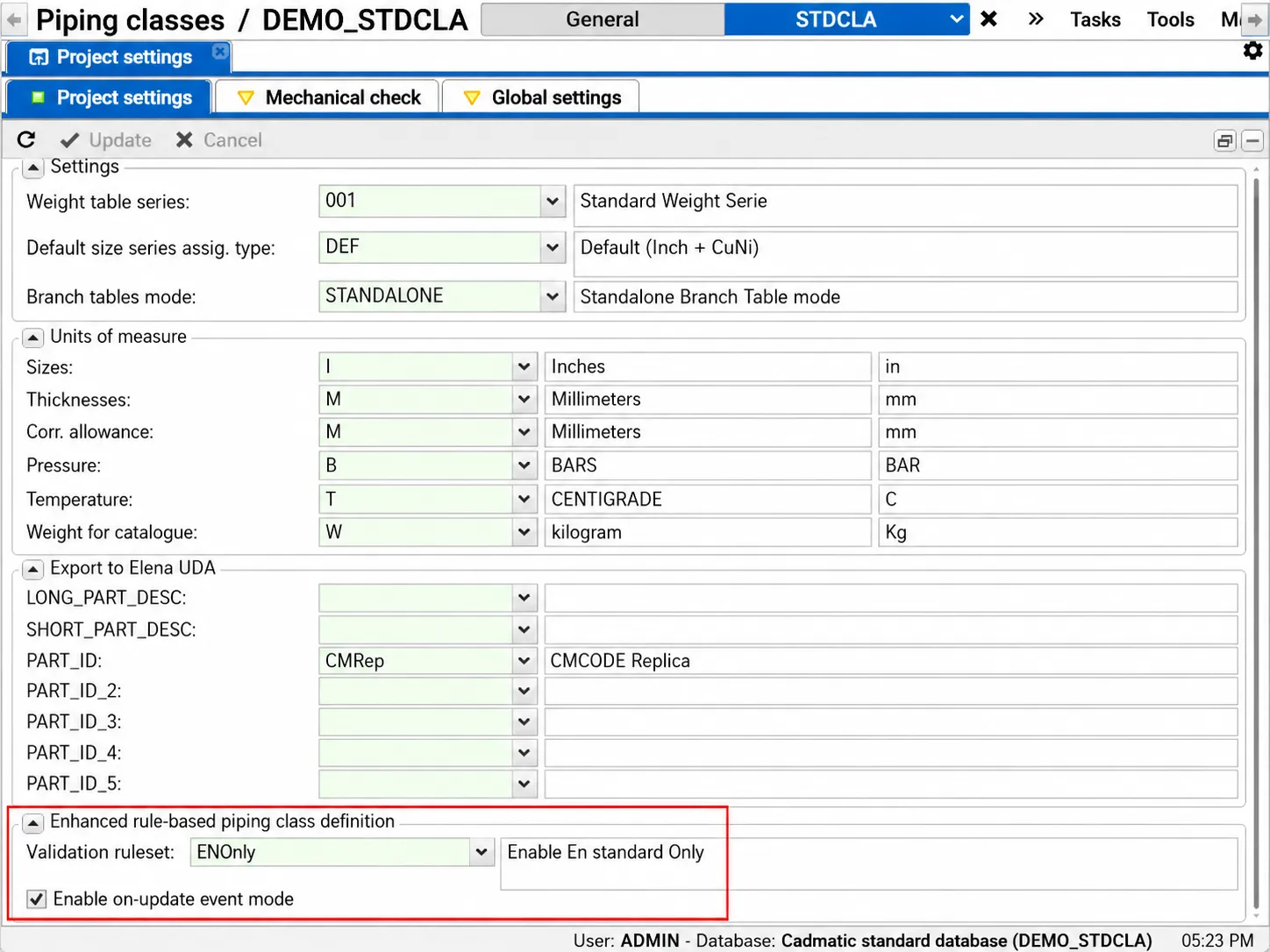
Validation criteria: improvement in piping class definition quality
In addition to the built-in cross-dictionary dependencies, such as Object/End and Object/Standard, it is now possible to define multiple custom rulesets to guide users during the piping class creation phase.
Rules can, for example, limit the values for a specific component field based on the value of one or more fields in the same component. These rules act as validation checkpoints to prevent unexpected value combinations in piping class component definitions.
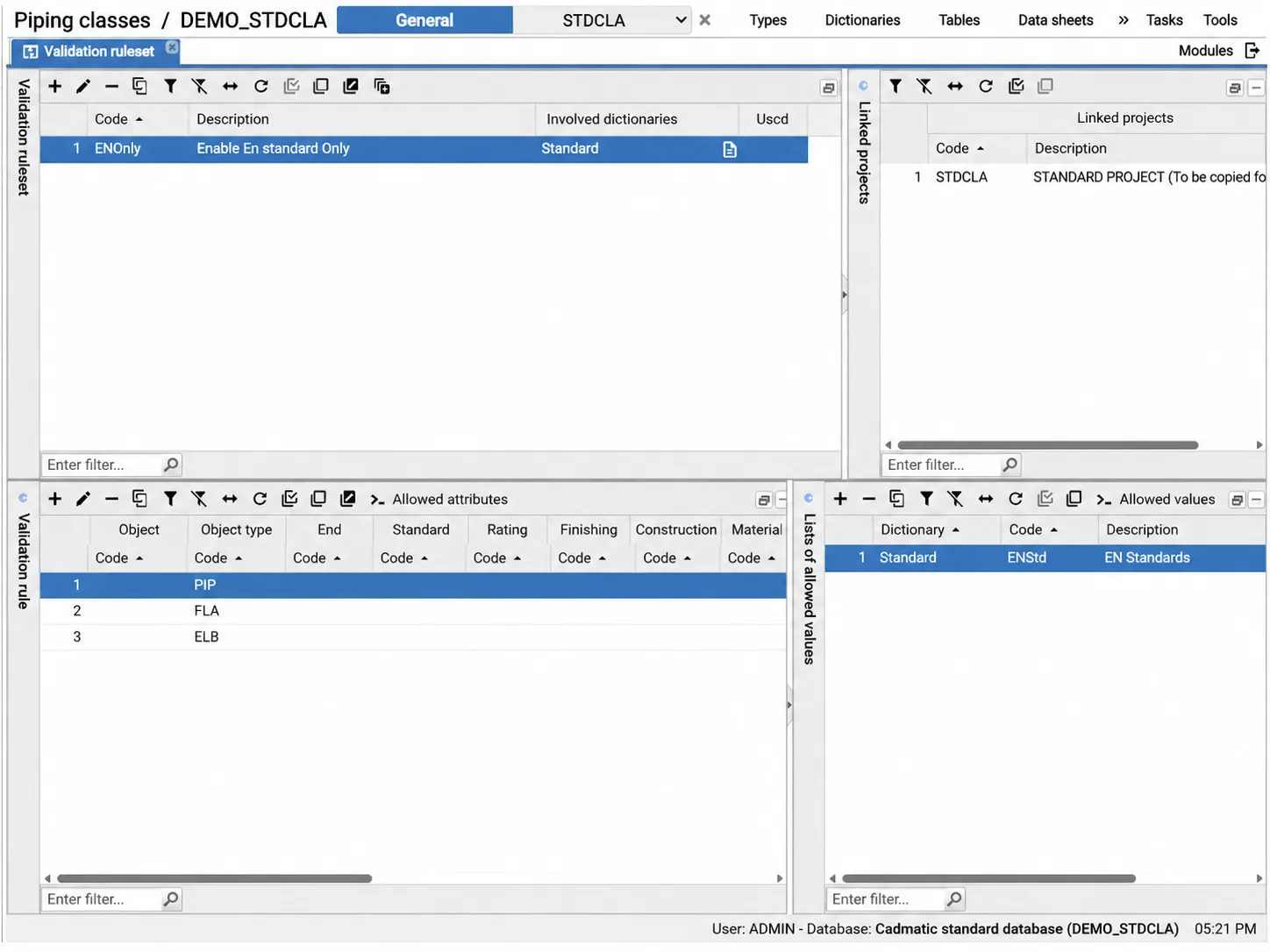
One or more sets of validation rules can be defined for a single Cadmatic Materials database. At the project level, the user can then select the active ruleset from those defined at the database level.
Custom catalogues
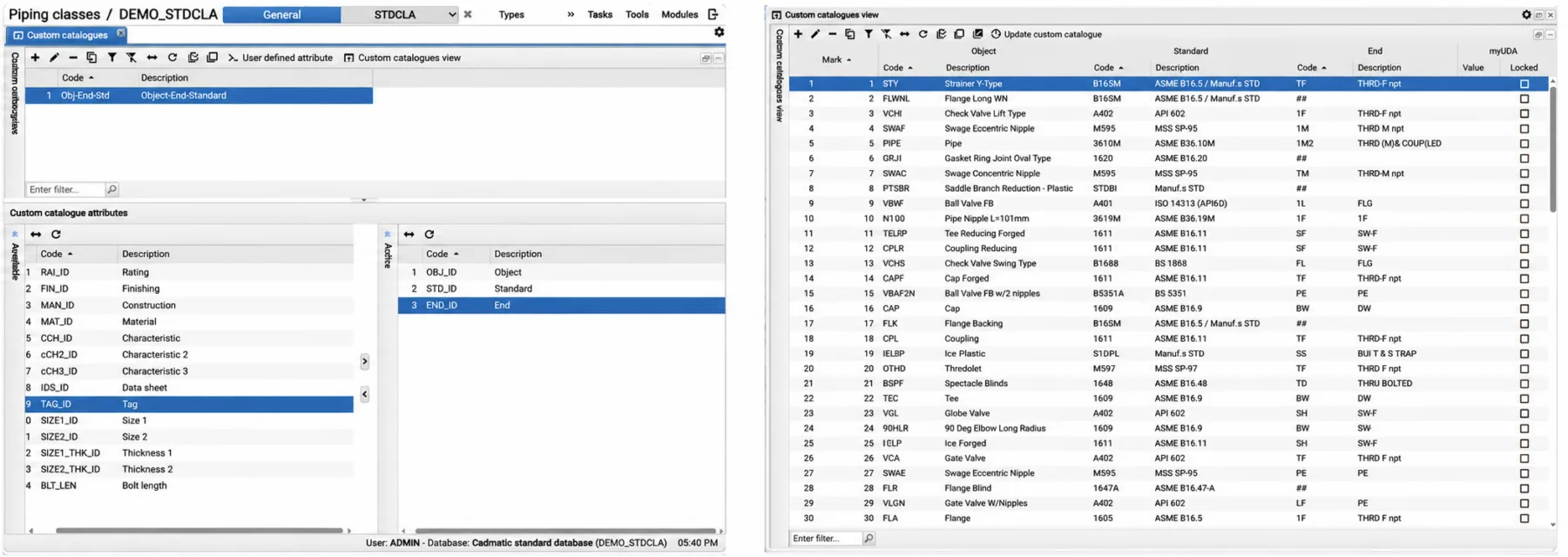
At the general database level, in addition to the main general catalogue, the user can now define their own General Custom Catalogues.
The user can define one or more custom catalogues using any subset of component-related attributes, including Object, Standard, End, Rating, Finishing, Construction, Material, Characteristics, Data Sheet, Tag, Sizes, Thicknesses, and Bolt Length.
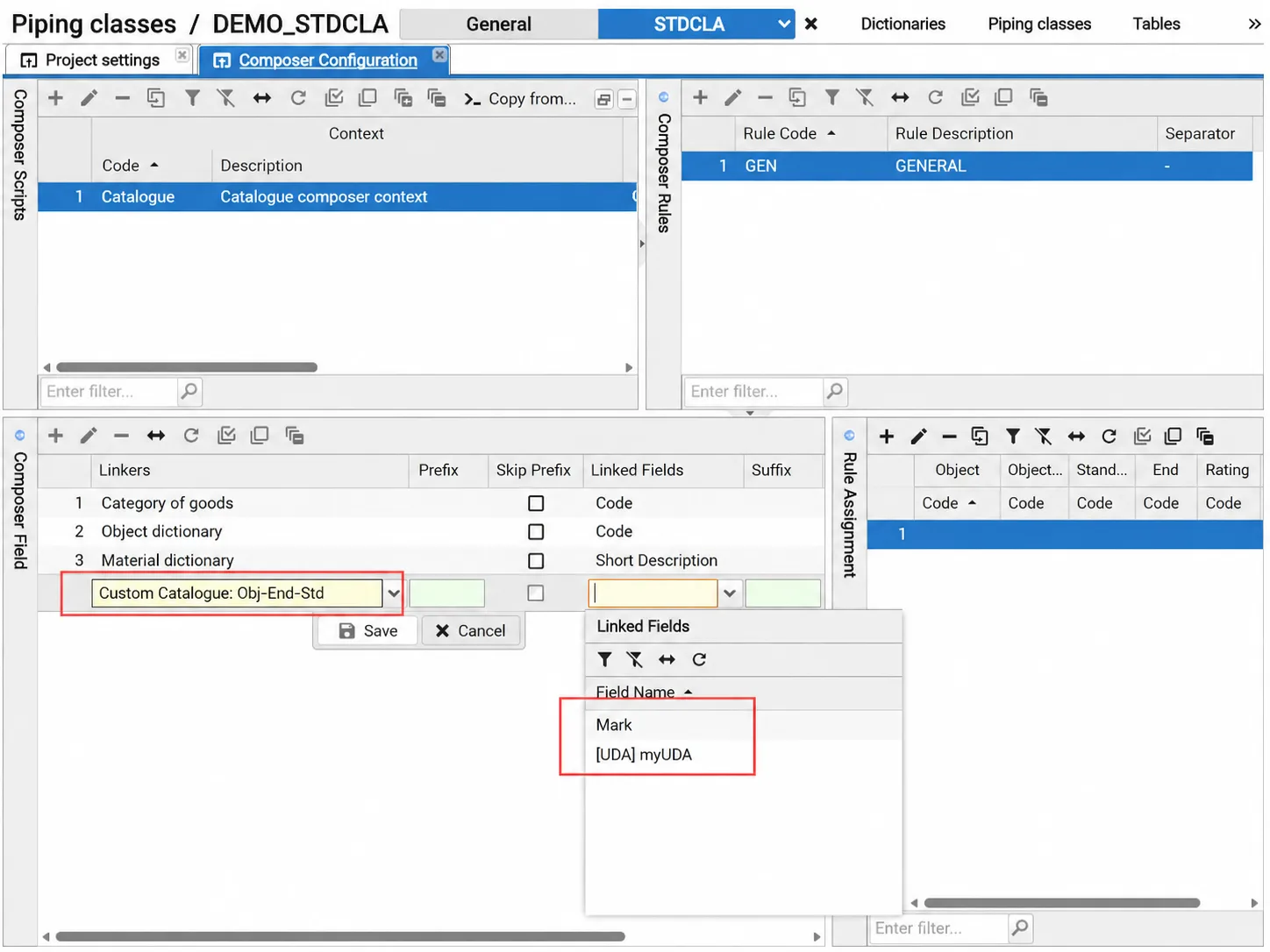
Once defined, Cadmatic Materials will keep these custom catalogues updated after each project and/or general catalogue update. Each item in each custom catalogue will be assigned a unique code, or “Mark” at the database level. The user can also add their own UDAs, or User Defined Attributes, to store any kind of additional data.
Both the unique codes assigned by the system and the UDAs can then be used within the Composer functionalities.
Engineering
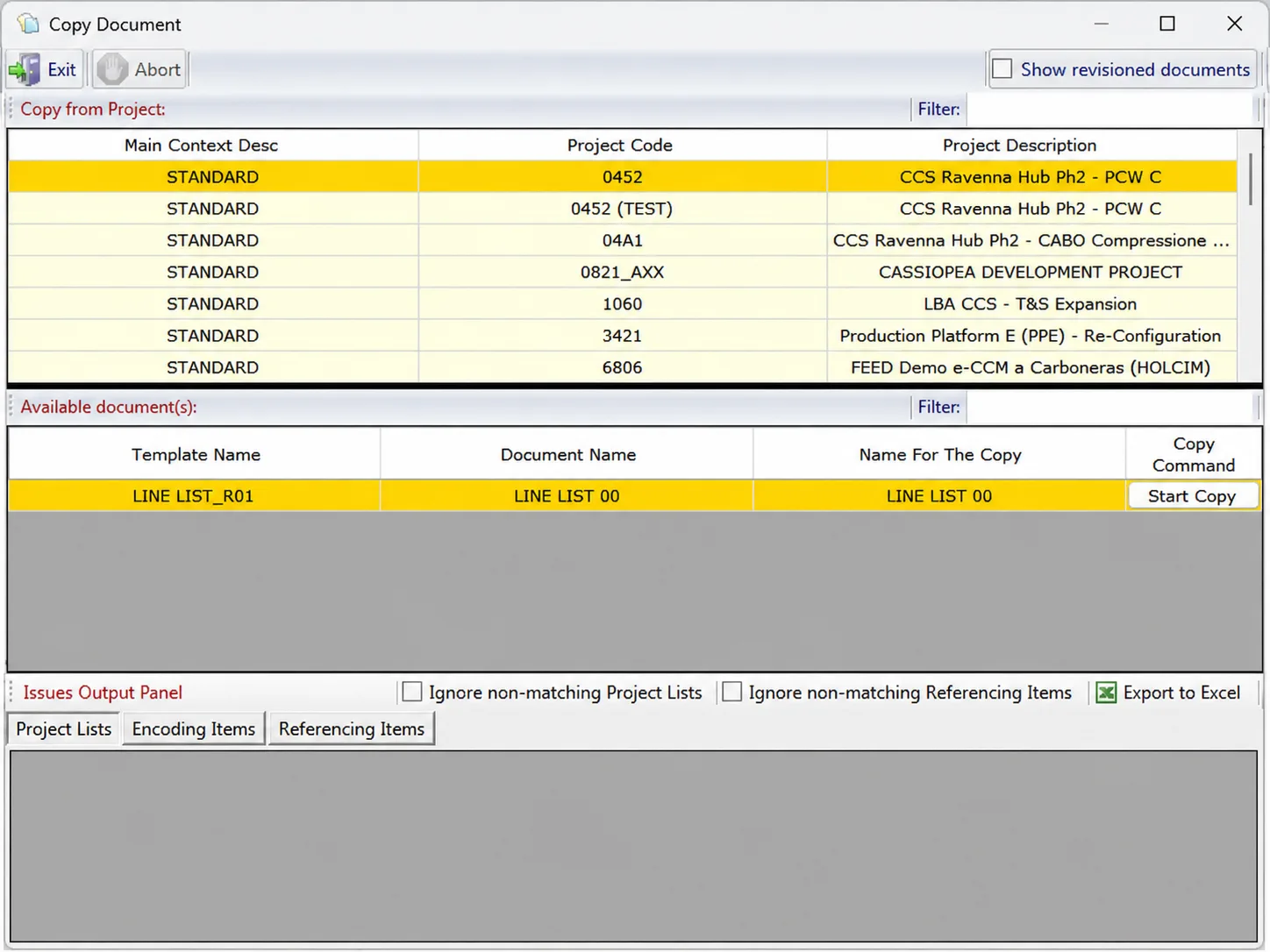
Document copy from project
This feature has been improved with new functions.
- New filters have been introduced to allow the user to quickly find the desired project and document to copy
- New check boxes have been introduced to allow the user to avoid blocking issues if the copying process finds non-matching project list values or referencing items
- The user can now export found issues in an external Excel document
- The copy process copies also the item state (marked as deleted or not)
Brand new project
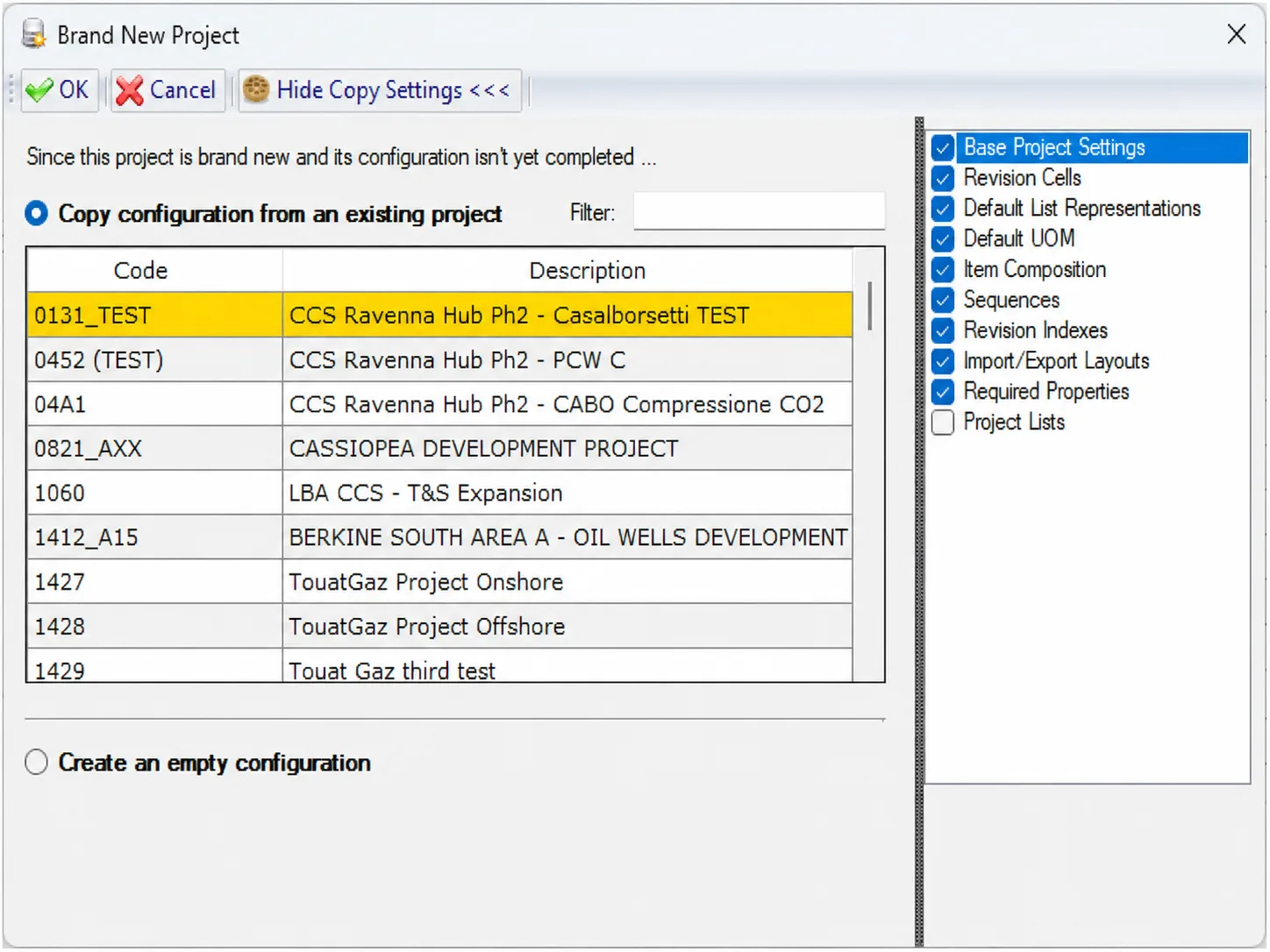
When initializing a new project, the user can now select which features to copy from a pre-existing project.
- Base project settings
- Revision cells
- Default list representations
- Default UOM
- Item composition
- Sequences
- Revision indexes
- Import/Export layouts
- Required properties
- Project list values
All the features are pre-selected by default except project list values
New plugin events and features
New events are now available for plugin development. All events are accompanied by the necessary information to identify the corresponding action
- Get item completed: issued at the end of the “Get process” regardless of the number of items imported.
- Cell value pasting (cancelable – generated before the “paste” action)
- Cell value pasted (generated immediately after the “paste” action)
- Document copied from project (cancelable – generated before the copy action)
- Document copied from project (generated immediately after the copy action)
- Project initializing (cancelable – generated before the initialization action)
- Project initialized (generated immediately after the initialization action)
New methods are now available for plugin development.
- Save formula values into the database
- Copy document from project
Template code and name
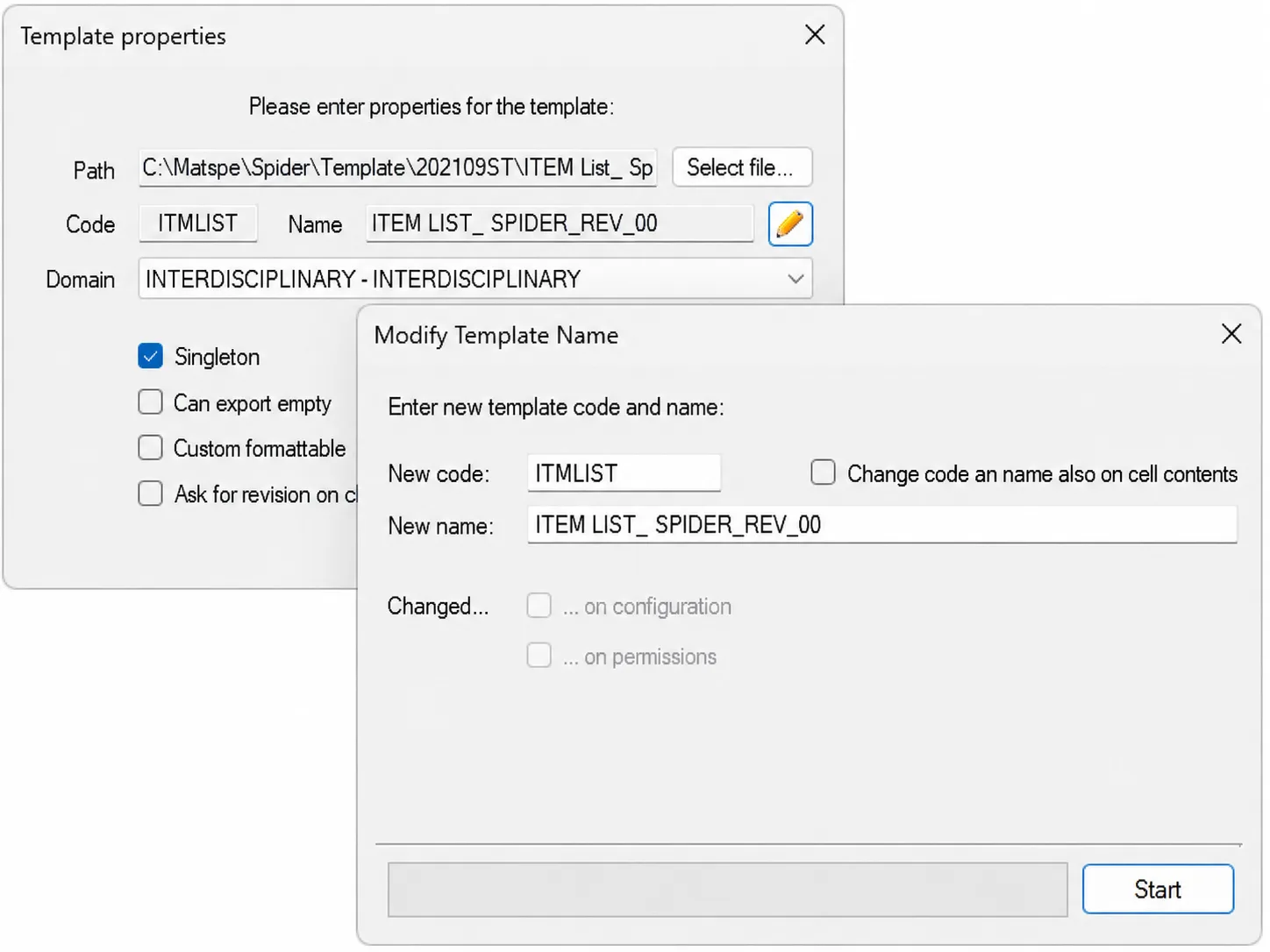
In the Configurator application, users can now easily change a template’s code and name in one step. They can use this new feature by pressing the “pencil” button next to the template name in the “Template properties” form.
Manage Section
This new feature allows you to:
- Manage the deletion of managed sections
- Insert new sections
- Rename and swap managed sections
The new feature is accessible via the “workbook explorer” (right-click on the template editor -> workbook explorer)
New loader warnings
In the Configurator application, loader functionality, new warnings can be issued for the following events:
- Unit of measure cells without related match
- Primary and foreign item cells in the same domain
- Workflow deadlock and self relations
- Non existing link details
- Template rename