How to keep your 3D design model fast on large projects
Why your 3D model slows down and how to fix it
Big projects are complex by nature. The performance hit in your 3D design software usually comes from one place: imported equipment carrying far more geometry than your project needs.
Importing OEM models from third-party software is standard practice. These often carry a lot of baggage, such as interior surfaces, small parts, redundant geometry, and features that your planning doesn’t need. All of it lands in your project file and adds up to a heavy project, making performance drop.
Keep the detail you need, get up to 26x lighter 3D model parts
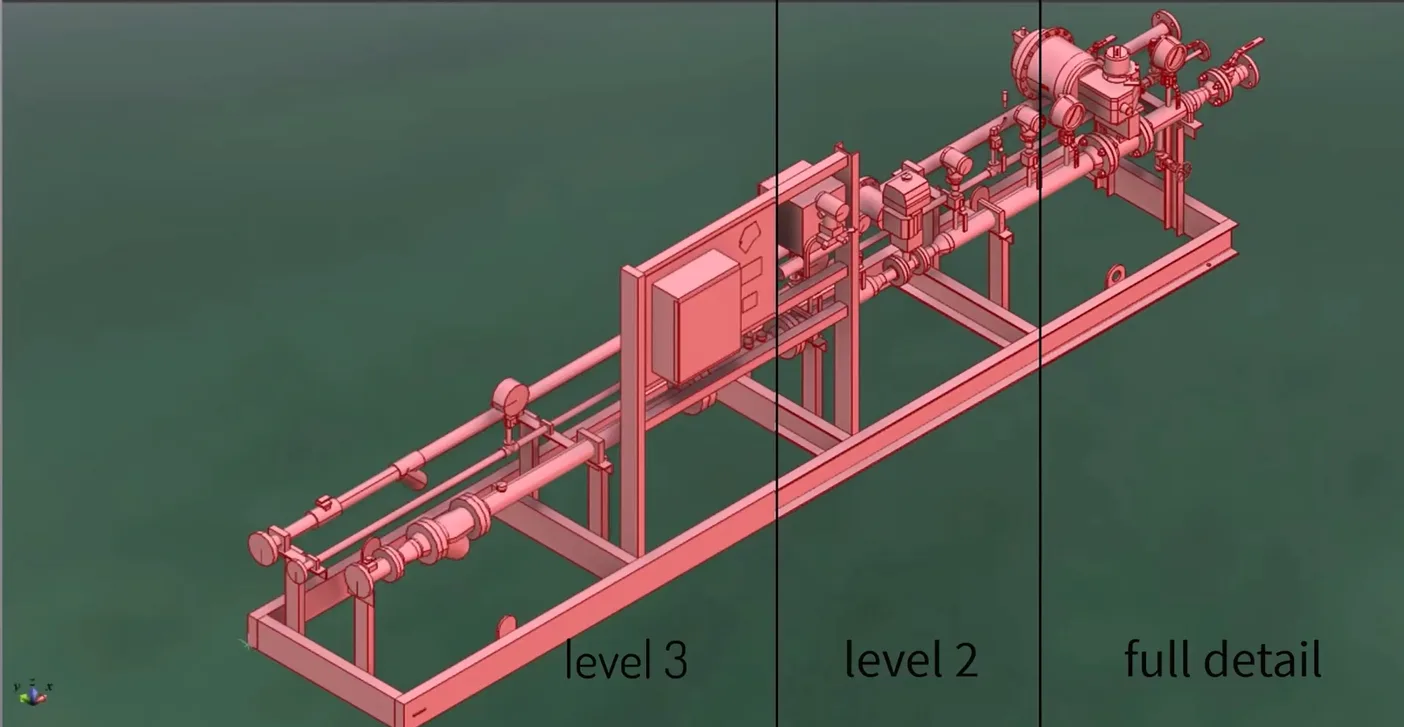
The Simplifier add-on for Cadmatic Outfitting and 3D Plant Design converts multi-format imports directly into native Cadmatic models. From there, you choose exactly how much geometry to keep – from full 3D detail down to lightweight space reservations.
This gives you control over the exact level of accuracy your current phase requires, without carrying geometry you don’t need yet.
You load a 32 MB asset, select simplification level 2, and get a native Cadmatic model at 1.2 MB. That’s 26 times lighter, achieved by stripping interior surfaces and simplifying 3D primitives. Across an entire project, that amounts to hundreds of megabytes saved.
Performance that holds up at scale
The larger your project, the more this matters. Simplified imports keep your model fast. Once equipment is placed, you can add pipe, duct, or cable connections and continue modeling without performance headaches or sluggish viewports.
Simplifier is built for teams handling big, complex plants where performance consistency is what keeps projects moving.
How simplification works in 3D CAD software
Simplifier works by automatically removing what your model doesn’t need:
- Small parts and internal components that don’t affect planning or coordination
- Unwanted features and surfaces that inflate file size without adding value
- Complex structures converted into clean, basic shapes appropriate for your design phase
The result is a model that’s accurate to plan with and fast to work in. Watch the Simplifier add-on in action in this short video:

Handle large-scale projects with stable performance
Simplifier is available as an add-on to Cadmatic Outfitting and 3D Plant Design licenses. If your projects are growing and performance is starting to feel like a tax on your team’s time, this is the most direct path forward.
Learn more about Cadmatic’s collaboration with ITI to bring Simplifier to 3D Plant Design.